
Twitter viewers are everywhere. Almost none of them work for AI agents.

Updated
We curl-tested eight popular Twitter viewers the way an AI agent would. Most block scripts or hide data behind JavaScript. Here is what works.
In short: a Twitter viewer is a page that shows a public X profile, post, or trend list without an X account. There are dozens, and for a person in a browser most of them are fine. We fetched eight of the best-known ones the way an AI agent would, with
curland no cookies, on October 7, 2026. Two returned a Cloudflare challenge, two Nitter instances were down or legally blocked, three returned a JavaScript shell with no data in it, and one, FxTwitter, returned JSON but only for single posts and users. None of the viewer pages themselves could be read by a script. An agent-friendly Twitter viewer puts the request in the URL, returns JSON or Markdown from that same URL, prints its rate limit in headers, and shares field names with a metered API. That is how the Twitter viewer series on UnifAPI is built, and every page in it is free to use with no login, no account and no API key, rate-limited to 20 lookups per 10 minutes per visitor.
"Twitter viewer" is one of the most searched phrases around X, and it arrives in many spellings: "x viewer", the misspelled "twitter viwer", the Spanish and Portuguese "visualizador de twitter", the Korean "x 뷰어", the Japanese "twitterビューア". The intent behind all of them is the same: see what an account or a post looks like without signing in.
Who is typing those queries has changed. A growing share of lookups are not typed at all. They come from an agent that was asked to "check this account," from a script that refreshes engagement numbers nightly, or from a research workflow fanning out across fifty handles. Those callers do not care about a nice banner. They care whether the page can be addressed, read, and trusted by a program. This post is about that gap, and about what we tested before building our own viewer.
What a Twitter viewer does, and who uses one
A Twitter viewer reads X's public data and renders it on a page you can open without an account. Profile viewers show the bio, follower counts, and recent posts. Tweet viewers show one post in full with its media and metrics. Trend viewers list what is trending in a location. Some sites bundle several of these behind one search box.
The audience has two halves, and they need different things:
| Caller | What it needs from a viewer |
|---|---|
| A person in a browser | A fast page, a readable layout, and a way to follow links to the original on X. |
| An agent, script, or model | A URL that fully describes the request, a machine-readable body, and explicit limits. |
Most viewers were designed for the first half only. That was reasonable in 2022. It is a problem now, because the second half is where the repeat traffic comes from, and because the second half is what turns a viewer into a data source for an entire workflow.
We tested eight Twitter viewers the way an agent would
The method is deliberately simple, because it is exactly what an agent does on its first attempt. For each viewer we requested a public profile page for @NASA (or the closest equivalent the site offers) with curl, default user agent, no cookies, no JavaScript. We recorded the HTTP status, whether the profile data was in the first response, whether any JSON, Markdown, or RSS alternate existed, and whether the site documents a path for agents. Where a site blocked the default user agent we tried again with a Chrome user agent string.
| Viewer | What curl got | Data in first response | JSON / Markdown / RSS | Documented path for agents |
|---|---|---|---|---|
| Nitter (nitter.net) | No response | No | RSS, when an instance is up | None |
| xcancel.com (Nitter instance) | HTTP 451, unavailable for legal reasons, RSS included | No | No | None |
| Sotwe | HTTP 403, Cloudflare "Just a moment" challenge | No | No | None |
| Twstalker | HTTP 403, Cloudflare "Just a moment" challenge | No | No | None |
| twitterviewer.net | HTTP 200, a 5 KB JavaScript shell | No | No; its llms.txt says pages are not feeds | An MCP server behind OAuth 2.1 registration |
| TwitterShots viewer | HTTP 200, form-driven page; /twitter-viewer/NASA 404 | No | No | An llms.txt, no machine endpoint |
| Snaplytics | HTTP 200 landing page, viewer redirects to a form | No | No | None |
| FxTwitter (api.fxtwitter.com) | HTTP 200, JSON | Yes | JSON for one post or one user | The URL itself; no rate-limit headers, no search or trends |
| x.com itself | HTTP 200, a 147 KB JavaScript application | No | No | The official API, with a key and a plan |
Three things stand out.
First, the Nitter era is over for automation. Nitter stopped working in January 2024 when X removed guest accounts, came back in 2025 running on real accounts, and in August 2026 the project and its largest public instances received cease-and-desist letters from X Corp. On the day we tested, the biggest instance returned HTTP 451 for every path, including RSS. A workflow built on Nitter RSS has nowhere to go.
Second, the two viewers that rank well for human searches, Sotwe and Twstalker, are behind a Cloudflare bot challenge for any non-browser client. That is a reasonable choice for a site whose only audience is people, but it means an agent gets a 403 and an HTML page that says "Just a moment".
Third, the sites that do think about agents do it off to the side. twitterviewer.net publishes an llms.txt that states plainly that its profile and tweet pages are browser interfaces, not crawlable feeds, and points agents to an MCP server that requires OAuth registration. FxTwitter, which exists to fix link previews, is the only one that answers a plain URL with JSON, and it covers single posts and user records, not search, replies, media walls, trends, or followers.
So the honest summary is not "no viewer serves agents." It is "no viewer serves agents from the same URL a person uses, and the ones that serve them at all cover a sliver of X."
Seven ways Twitter viewers fail agents
The table above is one morning's data. The pattern behind it is consistent across the category, and it is worth naming each failure because each one has a different fix.
| # | Failure | What it looks like | Why it breaks automation |
|---|---|---|---|
| 1 | No deep-link URL | The handle goes into a form; the result URL is the same as the empty page. | An agent cannot construct a request. It has to drive a browser and fill a form. |
| 2 | HTML only | There is no JSON, no Markdown, no plain-text alternate. | The model has to scrape a layout that was never meant to be read by a program. |
| 3 | Rendered by JavaScript | The first byte is an empty shell; the data arrives through a client-side fetch. | curl gets nothing. Headless browsing is slow and fragile. |
| 4 | Bot wall | A CAPTCHA or a JavaScript challenge appears for any non-browser client. | Scripts get blocked outright; agents cannot complete a challenge. |
| 5 | Silent rate limits | Nothing in the response says how many requests are allowed or when the window resets. | The agent learns the limit by being banned, then has no idea when to retry. |
| 6 | Unstable field names | Numbers live in <span> tags whose classes change with every redesign. | A parser that works today fails next month, silently. |
| 7 | Dead end at scale | The viewer has no path to a documented, metered API with the same fields. | Teams end up building a scraper on top of a page that was built for a human. |
Failures 1 through 3 explain why "twitter viewer API" and "twitter viewer json" are searches of their own. People find a viewer that works for their eyes, then discover there is no way to call it.
What an agent-friendly Twitter viewer looks like
Flip the seven failures and you get a short specification. An agent-friendly viewer should:
- Put the request in the URL.
?q=<handle>on a profile viewer,?q=<post URL or ID>on a tweet viewer. The URL alone reproduces the view, so it can be logged, cached, shared, and retried. - Return a machine format from that same URL.
?format=jsonfor programs,?format=mdorAccept: text/markdownfor a model that will read the result as text. Not a separate product, not a registration flow. - Serve the data on the first request. No empty shell, no second fetch to discover.
- Treat non-browser clients as normal. A script and a browser get the same answer. Abuse control runs at the network edge and is tuned for volume, not for client type.
- State its limits.
X-RateLimit-Limit,X-RateLimit-Remaining, andX-RateLimit-Reseton every response. A 429 carriesRetry-Afterand says where the cap can be lifted. - Keep field names stable and documented.
profile.followersstaysprofile.followers. - Lead somewhere. When one lookup becomes five hundred, the same field names should be available from a metered API with a key, so the code does not change.
This is how the free X viewer series on UnifAPI is built. Each viewer page is a thin layer over a free endpoint under /tools/x/, so the browser and the agent read exactly the same record, and the record has the same shape as the paid X / Twitter API.
How agents find a Twitter viewer in the first place
Discoverability for agents is its own problem, and it is not the same as ranking for "twitter viewer".
When a person asks an assistant to "look at @NASA's recent posts," the assistant usually tries https://x.com/NASA first and gets a JavaScript application with no data in it. Its next step is a web search, and the queries it writes are not the ones a person types. They are problem statements. In our experience building and testing agents on public data, the queries look like:
view x profile without login jsonget tweet by url as json no api keyx.com returns empty page curl how to read profiletwitter trends api free no keynitter alternative api 2026fetch twitter replies for a tweet id
The pages that win those queries share a few traits. They put the literal URL pattern in the text, not behind a button. They show a curl example and a sample response. They use the words an agent is scanning for: JSON, Markdown, no API key, rate limit, Retry-After. They publish an llms.txt, and ideally a Markdown alternate of every page, so a model can read the whole thing in one request. And they say what the tool will not do, because an agent that knows the boundary stops wasting calls on protected accounts.
We applied that to the viewer pages themselves. Every X viewer on UnifAPI states its endpoint, its parameters, and its limit in the first paragraph, carries a Markdown alternate, and is listed in the site's llms.txt. The point is not to game anything; it is to answer the agent's question in the agent's vocabulary, on the page it lands on.
Calling a Twitter viewer from the command line
Every viewer in the series has a URL form and an endpoint form. Both are free, both are rate-limited per visitor, and both return the same body.
A public profile as JSON:
curl -s "https://unifapi.com/tools/x/profile?handle=nasa" | jq '.profile.followers, .engagementRate'
The same profile as Markdown, which is what you want when the result goes straight into a model's context:
curl -s -H "Accept: text/markdown" "https://unifapi.com/tools/x-profile-viewer?q=nasa"
One post by URL:
curl -s "https://unifapi.com/tools/x/post?url=https://x.com/NASA/status/1234567890123456789"
The replies under it, most-liked first, then the next page:
curl -s "https://unifapi.com/tools/x/replies?id=1234567890123456789&sort=top"
curl -s "https://unifapi.com/tools/x/replies?id=1234567890123456789&sort=top&cursor=<nextCursor>"
Live trends for a location, as Markdown:
curl -s "https://unifapi.com/tools/x/trends?location=japan&format=md"
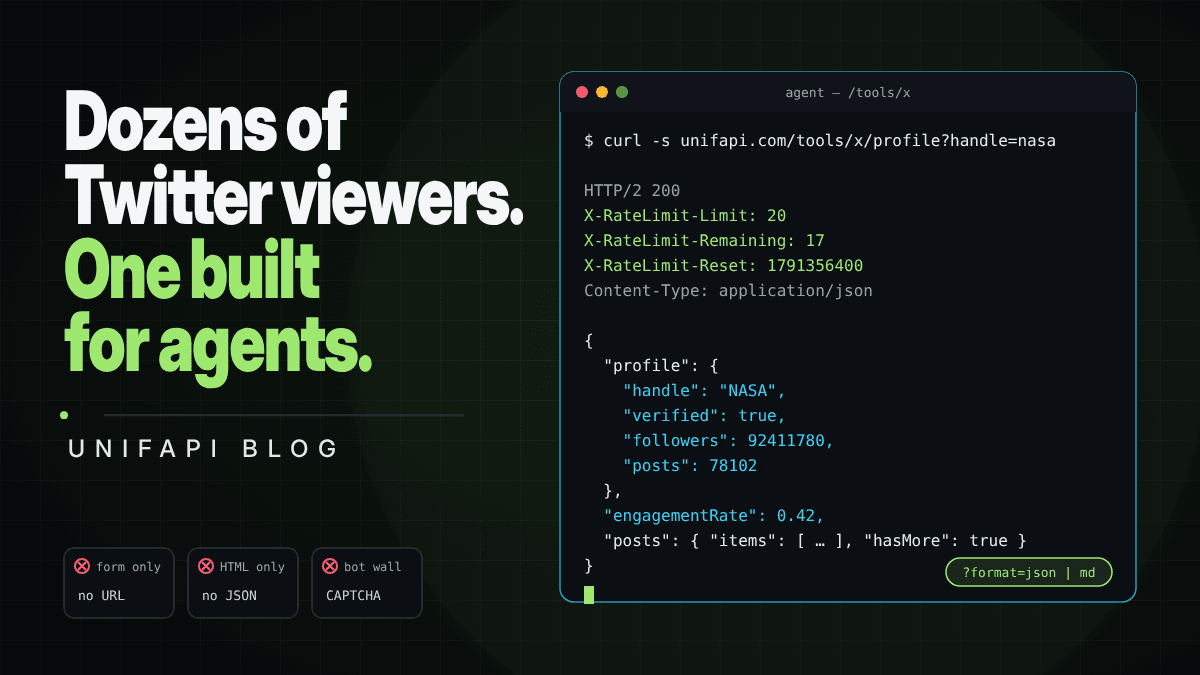
Every response carries the rate-limit headers, so a well-behaved agent reads X-RateLimit-Remaining and paces itself instead of guessing:
HTTP/2 200
X-RateLimit-Limit: 20
X-RateLimit-Remaining: 17
X-RateLimit-Reset: 1791356400
Content-Type: application/json
When the window is spent, the 429 body is JSON too, and it names the upgrade path rather than leaving the caller to search for one:
{
  "error": {
    "type": "rate_limited",
    "message": "Free limit of 20 requests per 10 minutes reached. Retry after 412s, or use a UnifAPI workspace key (pay as you go) for uncapped access.",
    "retryAfterSeconds": 412,
    "upgrade": "https://unifapi.com/apis/twitter"
  }
}
Endpoint reference
The nine viewers share one envelope. Lists come back as { items, hasMore, nextCursor }; pass cursor=<nextCursor> to page. Every error is { error: { type, message } } with one of validation_error, not_found, rate_limited, upstream_error, upstream_unavailable.
| Endpoint | Required | Optional | Returns |
|---|---|---|---|
/tools/x/profile | handle (or q, username) | posts (1–10), cursor | profile, engagementRate, posts page |
/tools/x/post | id (or url, q) | post with author, media, quoted, metrics | |
/tools/x/media | handle | cursor | profile, posts page of media posts |
/tools/x/replies | id (or url) | sort=top|recent, cursor | post, replies page |
/tools/x/search | q | cursor | query, posts page; X search operators work |
/tools/x/trends | location (slug or WOEID), woeid | woeid, locationSlug, generatedAt, trends[] | |
/tools/x/communities | q | cursor | query, communities page |
/tools/x/followers | handle | kind=followers|following, cursor | profile, kind, users page |
Add format=md to any of them, or send Accept: text/markdown, to get the same content as Markdown. Every viewer page accepts the same parameters as ?q= plus format=, so /tools/x-profile-viewer?q=nasa&format=json and /tools/x/profile?handle=nasa are the same request.
The full series
One viewer is rarely enough. Vetting a creator means a profile, the media tab, and a few reply threads. Tracking a story means search plus trends. The series covers the public surface of X in nine pages.
| Viewer | Free endpoint | Reads |
|---|---|---|
| Twitter viewer | routes to the others | Paste anything; the hub opens the right page. |
| Twitter profile viewer | /tools/x/profile | Banner, bio, counts, recent posts, engagement rate. |
| Tweet viewer | /tools/x/post | One post with media, quoted post, and every metric. |
| Twitter media viewer | /tools/x/media | An account's photos and videos as a grid. |
| Twitter reply viewer | /tools/x/replies | The conversation under a post, top or recent first. |
| Twitter advanced search | /tools/x/search | Posts matching a query, with X's search operators. |
| Twitter trends now | /tools/x/trends | What is trending on X today in ten locations. |
| X Communities finder | /tools/x/communities | Public Communities by topic, with member counts. |
| Twitter followers viewer | /tools/x/followers | Who follows an account, and who it follows. |
The hub page accepts a handle, a post link, a hashtag, or a free-text query and forwards it to the viewer that can answer it. For an agent that means one entry point: send the input to /tools/twitter-viewer?q=…&format=json and read the result.
What the viewers will not do
Agent-friendly does not mean unlimited, and it does not mean private.
- They read public data only. Protected accounts show their public header and nothing else.
- They are rate-limited per visitor: 20 lookups per 10 minutes, enforced at the edge and printed in the headers.
- They never sign in to X. No account of yours is involved, and nothing is written, liked, followed, or sent.
- Video plays from X's own CDN. Nothing is re-hosted or offered for download.
- They are not a substitute for X's terms. Use the records the way you would use any public page.
Those boundaries are also what make the output safe to cite. An agent can point at a public record and leave the operator in control of what happens next.
When a viewer stops being enough
Free viewers are for looking. The moment a workflow needs volume or guarantees, the same records are available through the X / Twitter API on UnifAPI with a workspace key. Pricing is pay as you go, with no free tier to outgrow and no subscription to size, and the field names match the viewers, so the prompt that worked against /tools/x/profile works against the API without being rewritten.
A typical path:
- A person tries the Twitter profile viewer on three handles.
- An agent is given the same URL with
?format=jsonand asked to score fifty handles overnight. It hits the per-visitor limit and reads the 429. - The team adds a workspace key and moves the loop to the API. The scoring code does not change.
That continuity is the point of building the viewer and the API on the same data layer.
FAQ
What is a Twitter viewer? A website that displays a public X profile, post, or trend list without requiring you to sign in to X. It reads only what the account has made public. "X viewer" and "Twitter visualizer" are the same thing under other names.
What is the best Twitter viewer without an account? For a person, any of the sites above that load for you will do; they differ mostly in ads and speed. For a script or an AI agent, the question is different: pick a viewer that answers a plain URL with JSON and prints its rate limit. On the day we tested, FxTwitter did that for single posts and users, and UnifAPI's viewers do it for profiles, posts, replies, media, search, trends, Communities, and followers.
Is there a Nitter alternative that still works for scripts? Not a drop-in one. Nitter's public instances are down or blocked, and no fork uses the same routes. For reading, use a viewer that returns Markdown or JSON from a URL. For feeds, use an API that returns the same posts as JSON and lets you page with a cursor.
Why do AI agents have trouble with most Twitter viewers? Most viewers put the request in a form rather than the URL, return only HTML, render results with JavaScript, block non-browser clients, and never say what their rate limits are. An agent needs the opposite on every count.
Can I get Twitter viewer results as JSON?
On UnifAPI's viewers, yes. Add format=json to any viewer URL, or call the matching /tools/x/ endpoint directly. Add format=md or send Accept: text/markdown for Markdown.
Is the free X viewer really free? What is the limit? Yes. Every view is a real lookup and costs nothing. Free views are limited to 20 lookups per 10 minutes per visitor, the headers tell you how many remain and when the window resets, and uncapped access is pay as you go with a UnifAPI workspace key.
Does a Twitter viewer show private or protected accounts? No. A protected account shows only its public header. Viewers read public data and never use an X login.
What to read next
Twitter viewer - the hub page; paste a handle, link, hashtag, or query.
Twitter profile viewer workflow - the five-minute check for vetting an account before outreach.
Agent-first skills for public data - how to wrap public-data lookups so an agent can use them without supervision.
X / Twitter API - the metered surface for when one lookup becomes many.